Traditional penetration testing has a fundamental timing problem. A point-in-time engagement gives...
Microsoft 365 Security Hardening Australia: A Guide to Securing your MS Environment

First Published:
February 17, 2026
Content Written For:
Small & Medium Businesses
Large Organisations & Infrastructure
Government
Read Similar Articles
Cloud Computing Security Services for Australian Businesses
As Australian businesses accelerate their move into the cloud, securing those digital environments...
SMB1001: A Cybersecurity Framework Guide for Australian Businesses
This article provides a guide to the SMB1001 framework. Cyber attacks now hit Australian...
How to defend against Infostealer Malware
Infostealer malware is not just another cyber threat. It is a silent data thief designed to...
A Guide to NIST Cybersecurity Framework Implementation
Getting a NIST Cybersecurity Framework implementation right is a strategic project, not just a...
Most Australian organisations deploy Microsoft 365 with default security settings. This creates a critical problem and Microsoft 365 hardening is one of the most effective approaches to improving your security posture and cyber resilience.
Research from Verizon’s 2025 Data Breach Investigations Report shows that 82 per cent of breaches involve identity compromise. Furthermore, nearly 60 per cent of enterprises still lack basic identity protections like multi-factor authentication. The average data breach now costs $4.88 million.
For Australian organisations, the stakes are even higher. You face regulatory requirements from the Essential Eight, APRA CPS 234, and the Privacy Act 1988. Therefore, Microsoft 365 security hardening isn’t optional. It’s a fundamental requirement for both compliance and risk management.
This guide walks through systematic approaches to hardening your Microsoft 365 environment. We’ll focus specifically on Australian regulatory requirements and practical implementation steps you can take today.
What Is Microsoft 365 Security Hardening?
Security hardening means configuring security controls beyond the default settings Microsoft provides. The goal is simple: reduce your attack surface and enforce your security policies.
Understanding the Shared Responsibility Model
Microsoft secures the underlying infrastructure. However, you remain responsible for:
- Identity management and access controls
- Data classification and protection
- Application security configuration
- User authentication policies
Many organisations assume Microsoft handles everything. This assumption leaves critical gaps in their security posture.
Hardening vs Compliance: What’s the Difference?
These terms often get confused, so let’s clarify:
Hardening involves technical security configurations that reduce vulnerabilities. You’re actively closing security gaps through platform settings.
Compliance means meeting regulatory frameworks and industry standards. You’re demonstrating adherence to required controls.
Hardening enables compliance. However, you can be technically compliant on paper whilst running an inadequately secured environment. Consequently, both matter.
Common Microsoft 365 Misconfigurations
Australian organisations frequently make these mistakes:
- Unrestricted Global Administrator accounts (should be limited to 2-3 emergency accounts)
- Legacy authentication protocols still enabled (SMTP, POP3, IMAP)
- Missing or weak Conditional Access Policies
- Insufficient data loss prevention controls
- No privileged access management
According to CoreView’s 2025 State of Microsoft 365 Security Report, organisations using Privileged Identity Management experience 64 per cent fewer security incidents. Meanwhile, those with excessive administrative privileges face 3.8 times higher compromise rates.
Why Australian Organisations Must Harden M365
You face specific regulatory drivers:
Essential Eight mandates user application hardening and multi-factor authentication as foundational controls.
APRA CPS 234 requires information security capabilities proportionate to your information assets.
Privacy Act 1988 establishes data protection obligations that require technical enforcement.
Therefore, systematic Microsoft 365 hardening directly supports your Australian compliance requirements.
Foundation: Identity and Access Management
Identity represents your primary attack surface in cloud environments. Fortunately, Microsoft’s research shows that multi-factor authentication blocks 99.9 per cent of automated credential attacks.
Enforce Multi-Factor Authentication Everywhere
MFA should cover every single user account. No exceptions.
Implementation happens through Azure Active Directory (recently rebranded as Microsoft Entra ID). However, don’t use the legacy per-user MFA settings. Instead, configure MFA through Conditional Access Policies.
Why? Conditional Access provides granular control and integrates with Zero Trust architecture.
Best practice: Use the Microsoft Authenticator app rather than SMS. SMS authentication remains vulnerable to SIM-swapping attacks and interception.
Implement Conditional Access Policies
Conditional Access evaluates context before granting access. Specifically, it checks:
- User location
- Device compliance status
- Application sensitivity
- Sign-in risk level
Australian organisations commonly implement these policies:
- Location-based policies restrict administrative access to Australian IP ranges only.
- Device compliance requirements mandate endpoint protection before granting access.
- Risk-based policies automatically block high-risk sign-in attempts.
Block Legacy Authentication Protocols
Legacy protocols like SMTP, POP3, and IMAP lack modern security capabilities. Moreover, they completely bypass Conditional Access Policies and MFA requirements.
Here’s your implementation roadmap:
- Identify which applications still depend on legacy protocols
- Migrate these applications to modern authentication
- Disable legacy protocol support at the tenant level
Microsoft recommends blocking legacy authentication as a critical hardening control.
Deploy Privileged Identity Management
Traditional administrative access grants permanent privileges. This creates unnecessary risk.
Privileged Identity Management changes the model completely. Administrators request time-limited elevation with approval workflows. Each request requires justification and creates an audit trail.
This approach dramatically reduces your window of vulnerability if credentials get compromised.
Follow Role-Based Access Control Principles
Limit Global Administrator assignments to emergency accounts only. Microsoft 365 provides numerous granular administrative roles:
- Exchange Administrator
- SharePoint Administrator
- Security Administrator
- Compliance Administrator
Following least privilege principles significantly reduces blast radius in compromise scenarios. Additionally, the CoreView research shows that organisations with more than five standing Global Administrator accounts face substantially elevated breach risk.
Essential Eight Alignment
These identity controls directly satisfy Essential Eight requirements:
User application hardening (Maturity Level 2) requires restricting administrative privileges. Your RBAC and PIM implementations address this.
Multi-factor authentication requirements span Maturity Levels 1 through 3. Microsoft Authenticator satisfies Levels 1-2, whilst FIDO2 security keys address Level 3 phishing resistance.
Organisations pursuing Essential Eight compliance should document control implementation through configuration exports and audit logs.
Threat Protection and Detection
Microsoft Defender for Office 365 provides your primary defence against phishing, ransomware, and malicious content. However, default configurations often leave critical protections disabled.
Enable Safe Links Protection
Safe Links scans URLs at time-of-click rather than time-of-delivery. This protects against delayed malicious payloads and websites that become compromised after email delivery.
Configuration requirements:
- Enable URL rewriting
- Block suspicious URLs automatically
- Apply policies to internal messages (not just external email)
Configure Safe Attachments
Safe Attachments implements detonation chamber analysis. Email attachments execute in isolated environments before delivery to users.
This provides zero-day protection through behavioural analysis. Furthermore, you should configure Safe Attachments in blocking mode rather than monitoring mode. This prevents malicious content delivery whilst analysis completes.
Strengthen Anti-Phishing Policies
Anti-phishing policies protect against impersonation attacks and business email compromise. These policies leverage machine learning to:
- Identify unusual sender patterns
- Detect domain impersonation attempts
- Analyse mailbox intelligence patterns
Australian best practice: Create dedicated anti-phishing policies for executive leadership and finance personnel with stricter thresholds.
Extend Protection to All Collaboration Workloads
Advanced Threat Protection extends beyond email. It should cover:
- SharePoint Online
- OneDrive for Business
- Microsoft Teams
This prevents malware propagation through file sharing and team channels.
Implement Email Authentication
Email authentication establishes sender verification through technical controls:
SPF records identify authorised mail servers for your sending domains.
DKIM provides cryptographic signature validation.
DMARC ties SPF and DKIM together whilst enabling reporting on authentication failures.
Complete email authentication deployment significantly reduces successful phishing and spoofing attacks.
Set Up Real-Time Alerting
Security teams need immediate notification of critical events:
- Successful account compromise
- Mass file downloads
- Suspicious administrative activity
- Policy violations
Integration with security information and event management platforms enables centralised incident response workflows.
Data Protection and Compliance Controls
Microsoft Purview encompasses data governance, compliance, and risk management capabilities. For organisations subject to the Privacy Act 1988, Purview provides essential technical controls.
Deploy Data Loss Prevention Policies
DLP policies prevent sensitive information disclosure through automated scanning and enforcement.
These policies identify content containing:
- Personally identifiable information
- Financial data
- Health records
- Intellectual property
When violations occur, DLP can block transmission, quarantine content, or restrict sharing permissions.
Target Australian Information Types
Australian organisations should implement DLP policies targeting:
- Tax file numbers
- Medicare numbers
- Driver licence numbers
- Financial account information
- Cross-border data transfer restrictions
Important consideration: Balance security effectiveness against operational friction. Overly restrictive policies generate false positives and user circumvention attempts.
Implement Sensitivity Labels
Sensitivity labels enable persistent classification and protection. Protection follows content regardless of location.
Labels apply:
- Encryption
- Access restrictions
- Visual markings
Australian organisations frequently implement these classifications:
- Public
- Internal
- Confidential
- Restricted
Each classification carries corresponding protection actions.
Establish Information Governance
Information governance includes retention policies and deletion schedules. The Privacy Act principle of data minimisation requires retaining personal information only as long as necessary.
Automated retention and deletion policies enforce these requirements at scale.
Map Compliance Baselines
ISO 27001:2022 controls map directly to Microsoft 365 configurations:
ISO 27001 Controls
- A.8 (asset management) addresses information classification and handling.
- A.9 (access control) covers user access management and authentication.
- A.18 (compliance) relates to legal and regulatory requirements.
Similarly, SOC 2 Trust Services Criteria for Security, Availability, and Confidentiality align with platform controls.
Organisations pursuing ISO 27001 compliance benefit from documented control mapping between framework requirements and technical implementation.
Continuous Microsoft 365 Hardening and Automation
One-time hardening isn’t enough. Your security posture requires ongoing attention as threats evolve and configurations drift.
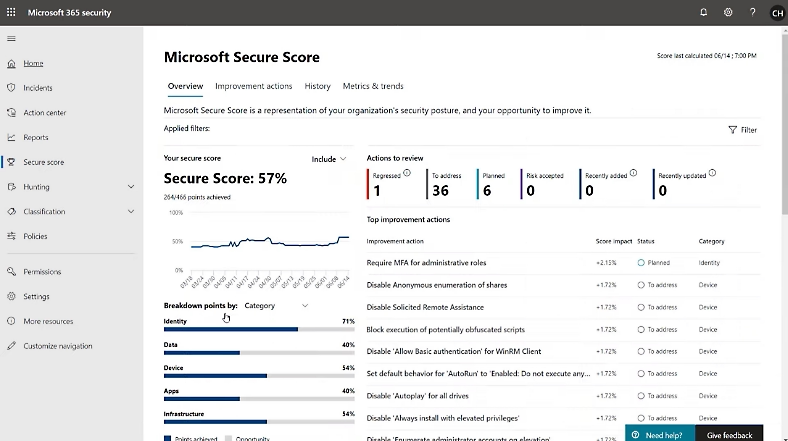
Understand Microsoft Secure Score
Microsoft Secure Score provides a measurement framework for your security posture. However, don’t confuse this metric with compliance status.
The Secure Score analyses enabled security controls against Microsoft recommendations. It then calculates a numerical score with improvement actions.
Optimise Your Score Strategically
Prioritise recommendations by impact and implementation complexity.
High-impact, low-complexity improvements should take precedence:
- MFA enforcement
- Legacy protocol blocking
- Basic Conditional Access Policies
Important caveat: Maximum scores often require premium licensing tiers. Additionally, a perfect score may not represent optimal security for your specific organisational context.
Automate Baseline Deployment
Manual configuration across multiple tenants creates consistency problems and operational overhead.
Platforms like Augmentt enable security administrators to:
- Define security baselines incorporating Conditional Access Policies, Defender configurations, and compliance settings
- Deploy these baselines across all tenants simultaneously
- Ensure consistent security posture with minimal effort
This approach proves particularly valuable for enterprises with subsidiary organisations, recent acquisitions, or federated operating models.
Detect Configuration Drift
Configuration drift occurs when unauthorised changes weaken your security posture. Well-intentioned administrators may unknowingly create security gaps through incremental changes.
Continuous monitoring compares current configurations against approved baselines. When deviations occur, automated alerts trigger remediation workflows.
Embrace Continuous Hardening
The distinction between continuous hardening and point-in-time audits proves critical:
Point-in-time assessments provide snapshots but fail to detect drift or respond to emerging threats.
Continuous hardening implements ongoing monitoring, automated baseline enforcement, and adaptive controls that evolve with the threat landscape.
This approach aligns with APRA CPS 234 expectations for continuous information security capability management.
For organisations seeking managed compliance services, automation platforms reduce manual overhead whilst improving security consistency.
Australian Compliance Integration
Your Microsoft 365 hardening programme should directly support Australian regulatory compliance.
Essential Eight Control Mapping
User application hardening addresses control over application execution and privilege restriction.
At Maturity Level 2, you must restrict administrative privileges to operating system and application functions. Microsoft 365 Privileged Identity Management and RBAC implementations directly satisfy these requirements.
Multi-factor authentication requirements span all maturity levels:
- Level 1: MFA for important data repositories and remote access
- Level 2: MFA for all users
- Level 3: Phishing-resistant authentication
Microsoft Authenticator with number matching satisfies Levels 1-2. FIDO2 security keys address Level 3 requirements.
APRA CPS 234 Requirements
APRA CPS 234 establishes information security obligations for APRA-regulated entities. This includes authorised deposit-taking institutions, insurers, and superannuation trustees.
The standard requires information security capability proportionate to information asset sensitivity. Therefore, Microsoft 365 environments hosting material information assets require systematic hardening.
Critical requirement: CPS 234 mandates incident notification to APRA within 72 hours of becoming aware of material information security incidents.
Microsoft 365 automated alerting supports timely incident identification. However, you must configure:
- Appropriate alert thresholds
- Escalation procedures
- Incident response playbooks
ISO 27001:2022 Annex A Controls
Key controls map comprehensively to Microsoft 365 capabilities:
- Control A.5.15 (access control) requires documented access control policies and enforcement mechanisms. Conditional Access Policies, RBAC, and PIM provide technical enforcement.
- Control A.5.17 (authentication information) mandates secure authentication information management. MFA, passwordless authentication, and credential lifecycle management address these requirements.
- Control A.8.2 (privileged access rights) requires restriction and monitoring of privileged access. PIM time-limited elevation combined with Unified Audit Log monitoring demonstrates control implementation.
Privacy Act Considerations
The Privacy Act 1988 introduces specific considerations:
Australian data residency requirements may apply to certain information types. Microsoft 365 Multi-Geo capabilities enable data residency control, storing user data at-rest within Australian datacentres.
Cross-border disclosure restrictions require documented data processing locations. Review Microsoft 365 data flows and configure appropriate geo-location restrictions.
Access logging supports Privacy Act accountability obligations. The Unified Audit Log captures:
- User authentication
- File access
- Administrative actions
- Configuration changes
Enable audit logging, configure appropriate retention periods, and integrate logs with your SIEM platform for comprehensive visibility.
IRAP Assessment Preparation
IRAP assessments require documented security controls, continuous monitoring evidence, and configuration validation.
Microsoft 365 hardening provides foundational controls supporting IRAP assessment preparation. Maintain these artefacts:
- Configuration baselines
- Change management records
- Continuous compliance evidence
- Access review documentation
Implementing Your Microsoft 365 Hardening Programme
Effective Microsoft 365 security hardening follows a systematic approach.
Phase 1: Assessment
Initial assessment identifies your current state through:
- Automated configuration scanning
- Manual security review
- Compliance gap analysis
- Risk identification
This establishes your baseline and prioritises remediation efforts.
Phase 2: Baseline Development
Baseline development translates your security policies and compliance requirements into technical configurations.
This includes:
- Conditional Access Policy design
- Microsoft Defender tuning
- DLP policy construction
- Sensitivity label taxonomy development
Baselines should comprehensively address identity protection, threat detection, data governance, and compliance requirements.
Phase 3: Deployment
Execute baseline implementation across production environments.
Best practice: Use phased rollout approaches. Target pilot groups before organisation-wide deployment to minimise operational disruption.
Automated deployment platforms reduce implementation time and ensure configuration consistency.
Phase 4: Continuous Monitoring
Track configuration compliance, detect policy drift, and identify emerging threats through ongoing monitoring.
Integration with virtual CISO services provides strategic oversight. This ensures your hardening programme aligns with evolving business requirements and threat landscapes.
Your Microsoft 365 Hardening Roadmap
Australian organisations should follow this implementation priority:
- Start with identity controls. MFA and Conditional Access Policies form your foundation. These controls block the vast majority of automated attacks.
- Next, configure threat protection. Microsoft Defender configuration and email authentication establish your defensive perimeter.
- Then deploy data governance. Purview implementation including DLP and sensitivity labels protects your information assets.
- Finally, implement continuous monitoring. Automated baseline enforcement ensures sustained compliance and adaptive security.
CyberPulse delivers comprehensive Microsoft 365 security hardening Australia services spanning assessment, baseline development, automated deployment, and continuous compliance monitoring.
Our approach integrates Essential Eight, APRA CPS 234, ISO 27001, and Privacy Act requirements through systematic technical implementation. Furthermore, we provide ongoing security operations support ensuring your hardening programme adapts to emerging threats and regulatory changes.
Frequently Asked Questions
What is Microsoft 365 security hardening?
Microsoft 365 security hardening involves systematic configuration of security controls beyond default platform settings. This reduces your attack surface, enforces organisational policies, and supports compliance requirements. Specifically, hardening covers identity protection, threat detection, data governance, and continuous monitoring.
How does hardening differ from compliance?
Hardening represents technical security configuration that reduces vulnerabilities and enforces controls. Compliance demonstrates adherence to regulatory frameworks and standards. Hardening enables compliance through technical implementation. However, compliance may exist on paper without adequate hardening in place.
Which Australian regulations require M365 hardening?
Essential Eight mandates specific controls including multi-factor authentication and user application hardening. APRA CPS 234 requires information security capabilities proportionate to asset criticality. The Privacy Act 1988 establishes data protection obligations requiring technical enforcement. Additionally, ISO 27001 and IRAP assessments evaluate security controls implemented through hardening.
How long does Microsoft 365 hardening take?
Initial baseline deployment typically requires 4-8 weeks depending on organisational complexity, user count, and compliance requirements. However, hardening represents a continuous process rather than a one-time project. Configuration drift, emerging threats, and platform updates require ongoing management and adaptation.
Can hardening be automated across multiple tenants?
Automation platforms enable baseline deployment, policy standardisation, and drift detection across multiple Microsoft 365 tenants. This capability supports enterprises with subsidiary organisations, acquisitions, or federated operating models requiring consistent security posture at scale.
Unsure if your Microsoft 365 environment is adequately secured?
CyberPulse offers a complimentary security hardening audit for Australian organisations. We review your current configuration and provide actionable remediation recommendations.
Audits slots are limited and only available to qualifying organisations.
Useful Links
Related Services
- Microsoft Security Services Australia
- Managed Cybersecurity Services
- Essential Eight Compliance
- ISO 27001 Certification Services
- Virtual CISO Services
External Resources
Browse to Read Our Most Recent Articles & Blogs
Subscribe for Early Access to Our Latest Articles & Resources
Connect with us on Social Media