This article provides a guide to the SMB1001 framework. Cyber attacks now hit Australian...
How to defend against Infostealer Malware

First Published:
April 1, 2026
Content Written For:
Small & Medium Businesses
Large Organisations & Infrastructure
Government
Read Similar Articles
A Guide to NIST Cybersecurity Framework Implementation
Getting a NIST Cybersecurity Framework implementation right is a strategic project, not just a...
What Is an Intrusion Test? A Guide for Australian Businesses
An intrusion test is an authorised, simulated attack on your organisation's systems, networks, or...
What is Endpoint Detection and Response?
Think of Endpoint Detection and Response (EDR) as an elite security detail for every single device...
Your Guide to a Resilient Information Security Policy
An information security policy is the foundational document that outlines your organisation’s...
Infostealer malware is not just another cyber threat. It is a silent data thief designed to operate undetected inside your network, stealing valuable credentials and sensitive information. An initial infostealer infection, therefore, often sets the stage for much more catastrophic attacks, such as ransomware.
Think of it as a quiet, digital insider threat, built to covertly harvest everything from browser passwords and session cookies to financial data.
What Is Infostealer Malware?
An infostealer is a specialised and stealthy type of malware engineered for one primary purpose: to steal information from a compromised computer. Unlike disruptive malware like ransomware that loudly announces its presence, an infostealer works silently in the background. Its goal is to remain undetected for as long as possible while it systematically finds and exfiltrates valuable data.
The real danger here is the access it provides attackers. By harvesting credentials for corporate networks, VPNs, cloud services, and financial accounts, it hands over the keys to your digital kingdom. Consequently, this access opens the door for much larger and more destructive attacks down the line.

The Specific Information Infostealers Target
Infostealers are programmed to hunt for specific, high-value data types that give attackers the most leverage. The malware meticulously scrapes systems for anything that can be used to gain further access, impersonate users, or be sold for profit on dark web marketplaces.
The table below summarises the primary data categories that infostealer malware is designed to steal, highlighting the direct risk to corporate assets and user privacy.
Key Information Targeted by Infostealer Malware
| Data Category | Description & Business Impact |
|---|---|
| Login Credentials | Usernames and passwords stored in browsers, email clients, and system vaults. Provides direct access to corporate applications, cloud platforms (AWS, Azure, Google Cloud), and SaaS tools. |
| Session Cookies & Tokens | Active session data that allows attackers to bypass multi-factor authentication (MFA) and take over authenticated user sessions without needing a password. |
| Financial Information | Credit card numbers, bank account details, and cryptocurrency wallet files. Leads to direct financial theft and fraud. |
| System & Network Information | Hostnames, IP addresses, running processes, and installed software. Helps attackers map the network, understand the environment, and plan their next move. |
| Email and Messaging Data | Access to corporate email accounts (e.g., Microsoft 365, Google Workspace) and messaging apps like Slack or Teams. Enables business email compromise (BEC) and social engineering. |
| VPN Credentials | Credentials for corporate Virtual Private Networks (VPNs). Gives attackers a foothold inside the corporate network perimeter. |
| Personal Identifiable Information (PII) | Names, addresses, phone numbers, and other personal data. Creates risks of identity theft and regulatory penalties for data breaches. |
Each piece of stolen data acts as a building block for a more significant compromise, turning a single infected device into a company-wide security incident.
Why This Threat Is Escalating in Australia
Australian organisations have become a prime target for threat actors deploying infostealer malware. The country is facing unprecedented cybersecurity challenges, with attacks growing in both frequency and sophistication. In fact, Australia has emerged as one of the most severely impacted nations globally.
Since 2004, over 193 million Australian user accounts have been compromised, making it the most affected country in the Oceania region. You can see how infostealer attacks impact Australian businesses to better understand the current landscape.
The Australian Cyber Security Centre (ACSC) has consistently warned about the dangers this malware poses. As the ACSC points out, the stealthy nature of an infostealer means victims often have no idea their devices are infected or that their data has been stolen, which makes proactive detection and response absolutely critical.
For Australian CIOs and CISOs, this represents a significant business risk. A single infostealer infection on an employee’s machine can escalate into a full-blown corporate data breach, leading to severe financial loss, regulatory penalties, and reputational damage.
The Gateway to More Damaging Cyber Attacks
It’s crucial to see infostealer malware not as a standalone incident but as the first critical step in a much broader attack chain. Threat actors use the credentials and data harvested by these tools to enable more damaging campaigns.
Common follow-on attacks include:
- Ransomware Deployment: Attackers use stolen administrative credentials to gain deep network access, disable security controls, and deploy ransomware across the entire organisation.
- Business Email Compromise (BEC): With access to executive email accounts, criminals can authorise fraudulent wire transfers or manipulate invoices, leading to direct financial theft.
- Data Exfiltration and Extortion: Sensitive corporate data, stolen via the initial access gained from the infostealer, can be sold on dark web marketplaces or used to extort the company.
This direct link between an initial infostealer infection and a major security event makes it a primary concern for any security leader. Defending against this threat is not just about protecting individual endpoints; it is about safeguarding the entire organisation from the devastating attacks that follow.
A robust defence requires a deep understanding of the threat landscape, which is why comprehensive cyber security threat intelligence is so important for modern security leaders.
The True Financial Impact of Infostealer Breaches
An infostealer infection is not just a technical glitch; it is a direct and escalating threat to your organisation’s bottom line. The real cost of a breach ripples out long after the initial incident, creating a cascade of expenses that can drag down profitability for years.
This is precisely why savvy Australian leaders now see proactive defence not as an IT cost centre, but as an essential investment in business continuity.
The first hit comes from the immediate, tangible costs. These are the bills for emergency incident response services, the forensic analysis needed to determine what happened, and the operational grind of removing the malware from your systems and restoring normal operations. However, these are just the opening act.
Quantifying the Rising Costs for Australian Businesses
The financial damage from cyber incidents is no longer a theoretical risk. It is a measurable and rapidly growing expense for Australian businesses, and the trend is making it impossible to ignore.
The numbers have reached a critical level. During 2026, the average cost per cyber incident for a medium-sized business shot up to $97,200, a massive 55% increase. Small businesses were not spared either, facing average costs of $56,600, while large enterprises saw a staggering 219% leap to $202,700 per incident.
These figures prove that an infostealer is not a low-level nuisance but a catalyst for major financial events. The stolen credentials are often the key that unlocks the door to far more expensive attacks, such as ransomware and business email compromise.
Beyond Direct Costs: The Hidden Financial Damage
Often, the most crippling financial consequences of an infostealer breach are the indirect, long-tail costs that quietly accumulate over months or even years. These less obvious expenses can ultimately dwarf the initial clean-up bill and inflict lasting harm on the business.
Key indirect costs include:
- Regulatory Fines: Under Australia’s Notifiable Data Breaches (NDB) scheme, failing to protect personal information can attract significant penalties from the Office of the Australian Information Commissioner (OAIC).
- Reputational Damage: News of a breach erodes customer trust. This leads directly to customer churn, makes winning new business harder, and tarnishes a brand image that is difficult and expensive to rebuild.
- Increased Insurance Premiums: A significant breach will almost certainly mean higher premiums for your cyber insurance policy at renewal. For some, it might even become tough to get adequate coverage at all, a topic we explore in our guide to cyber insurance in Australia.
- Business Interruption: System downtime during remediation is only part of the story. The distraction of your management and IT teams pulls them away from revenue-generating activities, leading to lost productivity and missed opportunities.
When you add up these direct and indirect costs, the business case for investing in strong defences against infostealer malware becomes undeniable. It is a strategic move to protect your entire organisation.
How Infostealer Attacks Unfold
To properly defend against an infostealer, you first need to understand its playbook. These are not random, smash-and-grab attacks. Instead, they follow a predictable, three-stage process designed to achieve initial compromise to data theft with quiet efficiency. By breaking down how they work, security teams can spot the critical points where they can intervene.
The attack almost always starts with a person, not a technical vulnerability. Attackers overwhelmingly favour social engineering to gain their foothold in the door. This is where a single employee’s momentary lapse in judgement becomes the organisation’s entry point for a breach. Indeed, one click is all it takes.
This diagram shows the typical attack chain from start to finish.
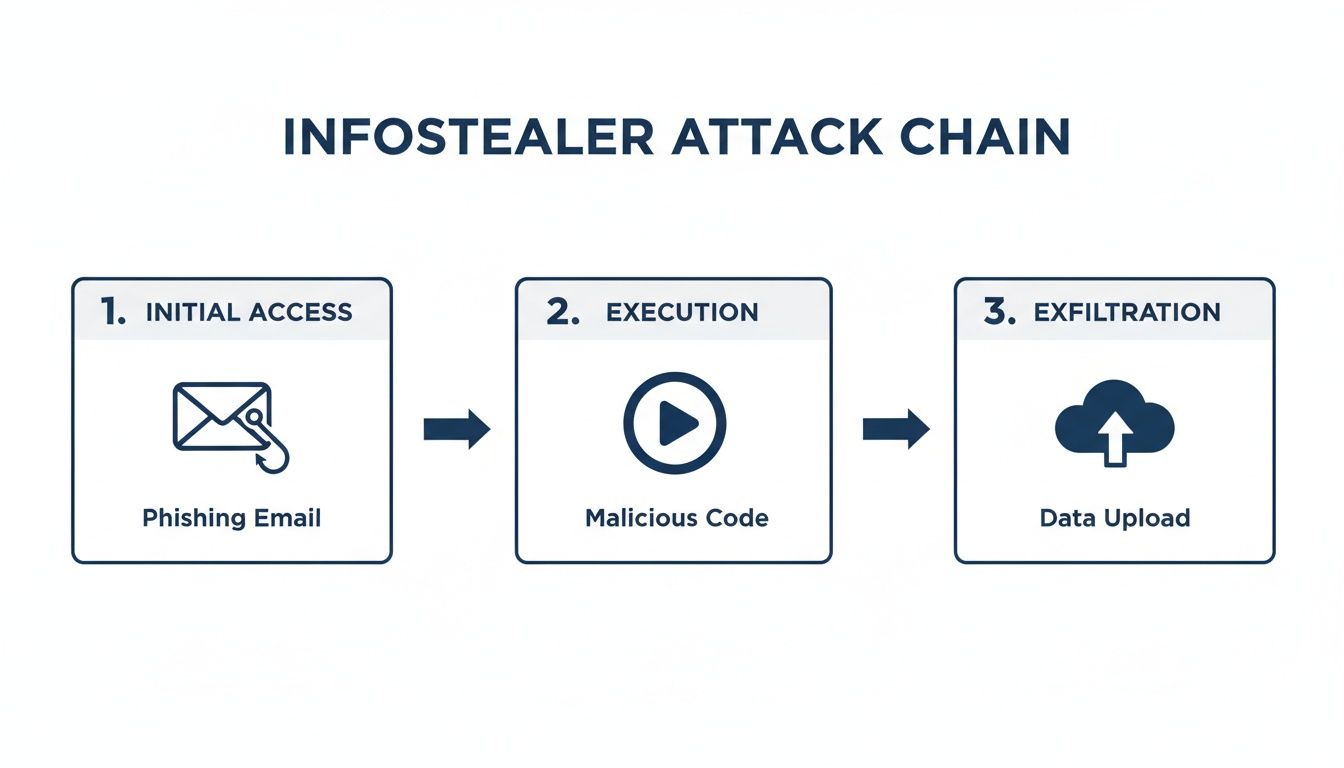
As you can see, the process moves quickly from a simple, deceptive action to the final theft of your organisation’s data. From the attacker’s perspective, it is a streamlined and highly effective process.
Stage 1: Initial Access and Execution
The most common way an infostealer gets onto a device is through a malicious email or a trojanised file. Attackers build sophisticated phishing campaigns that impersonate trusted brands, colleagues, or even government agencies. These emails carry attachments or links that, once clicked, run the malware.
For example, an employee receives an email that looks like a legitimate invoice from a known supplier. They open the attached PDF or Word document, and in the background, a hidden script executes. This script silently downloads and runs the infostealer payload, completely unknown to the user. You can read more about these targeted email threats in our detailed guide to spear phishing.
Another popular method is hiding malware inside what looks like legitimate software, usually downloaded from untrustworthy sites. This could be pirated business tools, modifications for games, or free utilities. Once it runs, the infostealer often establishes persistence, ensuring it re-launches every time the computer starts.
Stage 2: Data Collection and Harvesting
Once active, the infostealer begins its primary mission: finding and collecting valuable data. It is programmed to automatically scan the system for a specific list of information. The whole process is incredibly fast, often grabbing everything it needs within minutes of execution.
The malware is built to look in specific places where credentials and sensitive data reside, including:
- Web Browsers: It pulls saved usernames, passwords, cookies, autofill data, and credit card details from browsers like Chrome, Firefox, and Edge.
- Email Clients: It targets credentials stored in desktop applications like Outlook.
- VPN and FTP Clients: It steals connection details and login credentials for corporate networks.
- Cryptocurrency Wallets: It hunts for wallet files and private keys to drain digital assets.
Well-known infostealer families often seen in Australia, such as Redline, Vidar, and Lumma, are brutally effective at this stage. They are specifically designed to sidestep local security tools to access protected data stores. Some even steal active browser session cookies, which allows attackers to hijack logged-in sessions and bypass multi-factor authentication completely.
The sheer scope of this collection is what makes infostealers so damaging. It does not just steal a single password; it attempts to harvest every credential stored on the machine. This gives the attacker a full set of keys to the victim’s personal and corporate life.
Stage 3: Exfiltration and Monetisation
After grabbing the data, the final step is to send it all back to the attacker’s command-and-control (C2) server. The stolen information is usually bundled into a single compressed file, sometimes password-protected, and sent out over common web protocols like HTTP or HTTPS. This helps it blend in with normal network traffic and avoid detection.
The attacker receives a neat package containing the victim’s complete digital footprint. This data is then sorted, packaged, and sold on dark web marketplaces. Credentials belonging to high-value targets, like company executives or system administrators, fetch a much higher price.
The buyers of this data then use it to launch their own attacks, which often include ransomware deployment, business email compromise (BEC), and corporate espionage. The initial infostealer infection, therefore, becomes the starting point for a much larger, more destructive incident.
Practical Strategies for Detecting Infostealers
Now, let’s move from theory to what this looks like on the ground. Beating an infostealer comes down to proactive detection and hunting. A passive defence that just waits for an alert to fire is a recipe for disaster. Security teams must get on the front foot, actively searching for the faint signals of a compromise before it blows up into a full-blown breach.
This means taking a layered approach, digging into activity across your endpoints, network, and email environment. When your team adopts a hunter’s mindset, you stop just reacting to incidents and start preventing them. The goal is simple: catch the malware while it is still collecting and trying to ship data out, not after your corporate credentials are for sale on a dark web marketplace.

Endpoint Detection and Hunting
Your endpoints—the laptops, desktops, and servers your team uses every day—are ground zero. This is where an infostealer first lands and performs its dirty work, so your detection efforts must be sharpest right here. Modern Endpoint Detection and Response (EDR) tools are non-negotiable, giving you the deep visibility needed to spot the kind of suspicious behaviour that legacy antivirus software was never designed to see.
Good endpoint hunting is all about finding unusual process behaviours. For instance, your EDR should immediately flag when a common program like a PDF reader or Microsoft Word suddenly spawns a PowerShell script or tries to make an odd network connection. That is a classic sign of malware kicking off its payload. You can discover more about modern EDR capabilities in our guide to endpoint security solutions.
Keep an eye out for these key indicators on your endpoints:
- Suspicious Process Execution: Watch for strange parent-child process relationships, like
winword.exelaunchingpowershell.exeorcmd.exe. - File System Anomalies: Look for new executable files being created in unusual spots, such as
C:UsersPublicor temporary folders. - Credential Access Attempts: Your EDR should raise an alarm if a process tries to probe the Local Security Authority Subsystem Service (LSASS) memory or access browser credential stores.
- Unusual Scripting Activity: Hunt for PowerShell or
wscript.exerunning garbled, obfuscated commands or trying to download files from the internet.
Network and Email Traffic Analysis
While the infection happens on the endpoint, the stolen data must exfiltrate over your network. This gives you another critical chance to catch it. Monitoring outbound network traffic for strange patterns is a powerful way to spot a compromised machine calling home to its Command and Control (C2) server.
The Australian Cyber Security Centre (ACSC) consistently highlights how vital it is to monitor for unexpected network traffic, data flows, and DNS requests. An alert for an outbound connection from a user’s laptop to an unknown IP address, especially over a non-standard port, should be treated as an immediate red flag.
Security teams should focus their network analysis on a few key areas:
- Anomalous Outbound Connections: Look for devices connecting to IP addresses in unusual geographic locations or to domains with a poor reputation.
- DNS Query Monitoring: Hunt for DNS requests going to newly registered domains (NRDs) or domains known to be linked with specific malware families.
- Data Exfiltration Patterns: Be suspicious of unusually large uploads from a single endpoint. This could be the malware sending a zipped-up log file full of stolen credentials.
- Email Gateway Logs: Dig through email logs for suspicious attachments like LNK files or macro-enabled documents. See if any were blocked or delivered, and trace them back to their source and intended recipients.
To help structure your hunting efforts, here’s a quick summary of where to look and what to look for.
Infostealer Detection Strategies Across Your Environment
| Security Layer | Key Detection Technique | Example Indicator to Look For |
|---|---|---|
| Endpoint (EDR) | Process Behaviour Analysis | A document application (winword.exe) launching a command-line tool (cmd.exe). |
| Endpoint (EDR) | File System Monitoring | Creation of .exe files in a user’s AppDataLocalTemp directory. |
| Endpoint (EDR) | Credential Access Monitoring | Any process attempting to read memory from lsass.exe. |
| Network (Firewall/Proxy) | Outbound Traffic Analysis | A user workstation making a connection to an IP address in a high-risk country. |
| Network (DNS Logs) | DNS Query Analysis | Multiple requests to a domain that was registered less than 24 hours ago. |
| Network (Firewall/Proxy) | Data Volume Monitoring | A user’s device uploading a single 50MB file to an unknown filesharing site. |
| Email Gateway | Attachment and Link Scanning | An inbound email containing a password-protected ZIP file with a .lnk file inside. |
Using these techniques together creates a much tighter defensive net, making it significantly harder for an infostealer to operate without being seen.
Proactive Threat Hunting and Intelligence
The growing threat of enterprise credential theft really drives home the need to be proactive. Recent research shows a frightening acceleration, with more than one in 10 infostealer infections now containing enterprise Single Sign-On (SSO) or Identity Provider (IdP) credentials. A massive 2.05 million infostealer logs in 2026 alone exposed corporate identity credentials, and Microsoft Entra ID showed up in 79% of those logs. As you can learn in the full research about these findings, this trend is making credential theft a primary funding source for ransomware gangs.
Proactive threat hunting means taking threat intelligence—Indicators of Compromise (IoCs) like malicious IPs, file hashes, and domains—and actively searching your environment for them. This is not about sitting back and waiting for an automated alert. Instead, it involves your security team forming a hypothesis (e.g., “Has the new Lumma infostealer variant tried to communicate from our network?”) and using it to guide a deep dive through logs and endpoint data. By actively hunting, you find the threats that slip past your automated defences, dramatically cutting your organisation’s risk.
Creating Your Infostealer Incident Response Plan
When you suspect an infostealer breach, your organisation’s ability to respond with speed and structure is everything. A panicked, disorganised reaction only worsens the damage, giving the malware more time to spread or exfiltrate data.
This is not a time for improvisation. A formal incident response (IR) plan, built around established frameworks like those from the ACSC and NIST, gives you the clear, phased playbook needed to navigate the crisis. The goal is to isolate the threat, remove it completely, and get back online while gathering the evidence needed to prevent it from happening again.
Phase 1: Containment
The immediate priority is to stop the bleeding. Containment is all about preventing the infostealer from causing more harm by cutting off its ability to move laterally across your network or phone home to its command-and-control (C2) server.
Your first move must be swift and decisive. Isolate any device you suspect is infected by disconnecting it from the network. Crucially, do not turn it off. Shutting down a compromised machine can destroy volatile memory (RAM), which often holds critical forensic evidence about the malware’s behaviour.
Key containment actions include:
- Isolate Endpoints: Disconnect the network cable or disable the Wi-Fi on suspected machines. Use your EDR or network access control tools to quarantine them remotely if possible.
- Block C2 Communications: If you identify the malicious domains or IP addresses the malware is contacting, block them at your firewall or web proxy immediately. This severs its lifeline.
- Segment Networks: If possible, use network segmentation to limit the blast radius. This stops the malware from spreading from a less secure user network to critical server environments.
A well-executed containment strategy buys your team valuable time. It turns an active, escalating crisis into a stable situation that your security team can start to methodically investigate and remediate.
Phase 2: Eradication and Recovery
Once the threat is contained, the next phases focus on getting rid of the malware and safely restoring business operations. Eradication means more than just deleting the malware file; you also have to remove any persistence mechanisms it created to ensure it cannot reactivate.
This involves a deep-dive forensic analysis of affected systems to understand exactly what the infostealer did. You need to identify every file it created, registry key it modified, and scheduled task it set up to survive a reboot. Simply running an antivirus scan is not enough.
Following complete eradication, recovery can begin. This process must be handled with extreme care to avoid re-introducing the threat.
The recovery process should include these critical steps:
- Restore from Clean Backups: Rebuild compromised systems from known-good, trusted backups that pre-date the incident. Never restore a system if you are not 100% certain the backup is clean.
- Force Company-Wide Password Resets: Assume all credentials on infected devices were stolen. Mandate a password reset for all users, starting with privileged accounts like administrators and executives.
- Revoke All Active Sessions: An infostealer likely stole session cookies. You must invalidate all active login sessions across your applications (e.g., Microsoft 365, Salesforce, AWS), forcing every user to re-authenticate with their new passwords.
Phase 3: Post-Incident Analysis
The work is not over once systems are back online. The final, and arguably most important, phase is the post-incident analysis. This is where you move from reactive clean-up to proactive improvement, asking the critical question: “How did this happen, and how do we stop it from happening again?”
A thorough root cause analysis is essential for building long-term resilience. This review should dissect the entire attack chain, from the initial access vector (like the phishing email an employee clicked) to the security gaps that allowed the malware to execute.
Learning from these events is crucial. You can find helpful guidance by reviewing resources such as an ACSC-aligned incident response plan template to formalise your process. This analysis feeds directly into strengthening your defences, closing security gaps, and ultimately hardening your organisation against future attacks.
Building Long-Term Resilience to Infostealer Threats
Moving beyond reactive incident response to build long-term, proactive resilience is the ultimate goal for any forward-thinking Australian organisation. Defeating the modern infostealer threat is not about winning a single battle; it is about embedding a security program that constantly adapts and endures.
This means shifting from one-off security fixes to a posture of continuous vigilance and improvement. For Australian business leaders, this involves weaving together technical controls, mature processes, and clear alignment with national cybersecurity standards. The aim is to make your organisation a much harder, and far less profitable, target for attackers.
Embracing a Proactive Defence with MDR
Automated security tools are essential, but they are no longer enough on their own. Sophisticated attackers design their malware to sidestep common preventative controls, operating in the blind spots of your existing technology. This is exactly where a Managed Detection and Response (MDR) service proves its worth.
MDR delivers the 24/7, human-led threat hunting that automated systems simply cannot replicate. Expert security analysts monitor your environment around the clock, actively searching for the faint signals of an infostealer infection that an EDR or firewall might miss. They hunt for subtle behavioural anomalies, suspicious process chains, and faint network whispers that point to a compromise already in progress.
This continuous human oversight delivers:
- Early Detection: Catching threats like an infostealer in their initial stages, long before significant data exfiltration can happen.
- Rapid Response: MDR teams can trigger containment actions in minutes, isolating compromised devices and shutting down lateral movement.
- Expert Analysis: Providing the deep forensic insight needed to understand the root cause and harden defences against future attacks.
By partnering with an MDR provider, organisations effectively rent an elite, 24/7 security operations centre. This frees up internal IT teams to focus on strategic initiatives, secure in the knowledge that expert eyes are always watching.
Aligning with Australian Cybersecurity Frameworks
For Australian organisations, a resilient defence is built on a strong foundation. The Australian Cyber Security Centre (ACSC) provides a clear, proven roadmap for this with its Essential Eight Maturity Model. While some see it as just a compliance exercise, the Essential Eight is a powerful, practical strategy for mitigating malware threats.
To build long-term resilience against infostealer threats, it is crucial to implement a robust information security risk management framework. The Essential Eight controls directly counter the primary tactics infostealers rely on:
- Application Control: Prevents unauthorised executables (like the infostealer payload itself) from running in the first place.
- Patching Applications and Operating Systems: Closes the known vulnerabilities attackers often exploit to gain their initial foothold.
- Restricting Administrative Privileges: Limits an attacker’s ability to move laterally and access sensitive data, even if they manage to compromise a user account.
- Multi-Factor Authentication: While not a silver bullet, it adds a critical layer of friction that makes stolen passwords far less useful to an attacker.
Achieving and maintaining a high level of maturity across the Essential Eight drastically raises the cost and complexity for any attacker. It turns your organisation from a soft target into a hardened one, forcing criminals to move on to easier victims. Partnering with a specialist firm can accelerate this journey, providing the expertise needed to implement these controls effectively and ensure you remain both audit-ready and genuinely secure.
Frequently Asked Questions About Infostealer Malware
Let’s tackle some of the most common questions Australian leaders ask us about infostealer malware.
How Does Infostealer Malware Differ from a Keylogger?
While both steal data, think of a keylogger as a simple eavesdropper and an infostealer as an active, professional burglar.
A keylogger just sits in the background, passively recording every keystroke someone types. An infostealer, on the other hand, is a specialised trojan built to hunt. It actively scours an infected device for specific, high-value data like saved browser passwords, session cookies, and cryptocurrency wallet files. This makes it a much faster and more dangerous tool for large-scale credential theft.
Can Multi-Factor Authentication Stop Infostealer Attacks?
MFA is an essential layer of defence, but it is not a silver bullet against modern infostealers. While MFA is brilliant at stopping an attacker from using a stolen password on its own, sophisticated malware has found a way around it.
Many infostealers now target and steal browser session cookies. An attacker can inject these stolen cookies into their own browser, effectively hijacking a user’s already authenticated session. Consequently, this bypasses the need for a password or an MFA prompt entirely. It is why MFA must be part of a broader defence that includes strong endpoint protection and user behaviour monitoring.
The ability to bypass MFA using stolen session tokens is a primary reason why infostealer infections can escalate so quickly into major security incidents. This technique effectively gives attackers the same level of access as the legitimate user.
What Is the First Step After a Suspected Infostealer Infection?
Your immediate priority is containment. You must isolate the suspected device from the network to stop the malware from spreading laterally or sending more data out. You can do this by physically unplugging the network cable or using your security tools to quarantine the endpoint remotely.
Crucially, do not turn the device off. Shutting it down can wipe volatile memory evidence that is vital for forensic analysis. Once the device is isolated, you should engage your internal security team or a third-party incident response partner to begin a formal investigation.
Implementing robust secrets management best practices is also key to protecting the ‘digital keys’ that infostealers actively seek in the first place.
At CyberPulse, we provide expert-led Managed Detection and Response (MDR) and Incident Response services to help Australian organisations hunt, contain, and eradicate threats like infostealers. Strengthen your defences by visiting us at https://www.cyberpulse.com.au.
Browse to Read Our Most Recent Articles & Blogs
Subscribe for Early Access to Our Latest Articles & Resources
Connect with us on Social Media