How Australian organisations procure information technology has changed permanently. What was once...
Securing Video Conferencing Systems for Your Organisation
First Published:
March 23, 2026
Content Written For:
Small & Medium Businesses
Large Organisations & Infrastructure
Government
Read Similar Articles
Have I Been Hacked? A Guide for Australian IT & Risk Leaders
That sinking feeling often starts with a single, urgent question: "Have I been hacked?" For...
Guide to ISO 31000 Risk Management in Australia
In the Australian threat environment, a purely reactive approach to risk is no longer a viable...
What Is Vishing? A Guide to Identifying Voice Scams
Vishing, a portmanteau of voice phishing, is a social engineering attack where criminals use the...
What is spear phishing: A 2026 guide to defending against targeted attacks
To understand what is spear phishing, think less of a wide net and more of a precision-guided...
The rapid shift to hybrid work has transformed video conferencing systems from a simple convenience into the digital boardroom for most Australian organisations. This change, however, creates significant security challenges that now demand a CISO's full attention, consequently making these communication tools a primary focus for risk management.
A strategic approach to securing these platforms is therefore no longer optional. It has become a core pillar of business resilience.
The Digital Boardroom and Its Exploding Risk Profile
Our reliance on virtual collaboration is not a temporary trend; it is a permanent fixture of modern business. For Australian IT and security leaders, this means you must start treating video conferencing systems with the same security rigour you apply to any other piece of critical infrastructure. Indeed, the days of seeing them as simple communication utilities are long gone.
This shift is backed by incredible market growth. The Australian video conferencing market is projected to push past USD 430 million in 2026 and rocket towards USD 1,039.5 million by 2033. For a CISO, this boom highlights a critical risk: the very scalability that drives adoption also exposes sensitive corporate data to a massive breach potential if not secured properly. You can find more detail on this market expansion on imarcgroup.com.
Balancing Accessibility and Security
The primary challenge for Australian leaders is striking the right balance. On one hand, these platforms have to be accessible and easy to use to keep productivity high. On the other, they must be hardened to defend against a growing list of threats, from data exfiltration to corporate espionage.
An improperly secured video conference is like a boardroom with unlocked doors and windows. In effect, it is an open invitation for unauthorised access, turning what should be a collaborative space into a high-stakes vulnerability. Every security decision you make must be viewed through this dual lens of functionality and protection.
A proactive, defence-in-depth strategy is essential. It moves your organisation from a reactive stance, where you are just patching vulnerabilities as they appear, to a state of continuous assurance where security is built into the entire lifecycle of your collaboration tools.
To provide a structured approach, we can summarise the core security and compliance domains that Australian leaders must address for their video conferencing platforms.
Core Security Pillars for Video Conferencing Systems
| Pillar | Key Focus for Australian CISOs |
|---|---|
| Architecture & Data Flow | Understanding where data is processed, stored, and transmitted, including transit through third-party networks. |
| Threat Modelling | Identifying and prioritising specific threats like eavesdropping, “Zoombombing,” and data exfiltration. |
| Compliance & Regulation | Aligning controls with mandates like IRAP, ASD Essential Eight, SOC 2, and ISO 27001. |
| Technical Controls | Implementing robust encryption (in transit and at rest), strong access management, and secure configurations. |
| Organisational Controls | Establishing clear acceptable use policies, user training programs, and incident response procedures. |
| Continuous Assurance | Moving beyond point-in-time assessments to ongoing monitoring, logging, and regular security testing. |
This table serves as a high-level map for the critical areas we will explore in detail throughout this guide.
A Framework for Australian Leaders
This guide offers an authoritative framework for achieving that balance. It is specifically designed for leaders in high-stakes sectors like finance, healthcare, and law, where the confidentiality and integrity of every conversation are non-negotiable. Specifically, we will provide actionable guidance for:
- Navigating Complex Architectures: Understanding the components and data flows of modern platforms.
- Addressing Evolving Threats: Identifying common attack vectors and threat scenarios relevant to Australia.
- Meeting Compliance Mandates: Aligning your systems with regulations like IRAP and the ASD Essential Eight.
Ultimately, mastering the security of your video conferencing systems is about protecting your organisation’s most sensitive conversations and decisions. It has become a core responsibility for any forward-thinking security leader in Australia today.
Mapping Your Video Conferencing Architecture and Attack Surface
You cannot secure what you do not understand. Before you can properly protect your video conferencing systems, you need a clear blueprint of how they work, from the user’s laptop all the way to the vendor’s cloud. Without this, security becomes little more than guesswork.
Think of it like a supply chain. Your sensitive data—the “cargo”—has to travel from the sender to the receiver. That journey involves multiple handoffs: from the user’s device, across public and private networks, through the vendor’s cloud servers, and finally to the recipient. Therefore, a vulnerability at any single point in that chain puts the entire delivery at risk.
Deconstructing the System Architecture
Modern video conferencing platforms are typically split into three core zones. Each one comes with its own set of security challenges, and understanding how your data flows between them is the key to finding the weak spots.
- Endpoints: These are the devices your team uses every day—laptops, mobiles, or dedicated room systems. They run the client software that captures, encodes, and sends the audio and video streams.
- Signalling Servers: Think of these as the air traffic controllers for your meetings. They handle session initiation, user authentication, and in-meeting controls like muting or screen sharing. Critically, they do not usually touch the media streams themselves.
- Media Servers and Gateways: This is the heavy-lifting infrastructure, almost always hosted in the cloud. These servers process, mix, and route the actual audio and video between all participants. This zone also includes gateways for connecting to traditional phone networks (PSTN).
For any CISO, getting a handle on this data flow is non-negotiable. The path from a microphone on one end to a speaker on the other is rarely a straight line. Instead, it is a complex route with multiple processing points, and every point expands the potential attack surface.
This shows how securing these digital boardrooms directly ties into enabling organisational growth, managing threats, and building genuine business resilience.
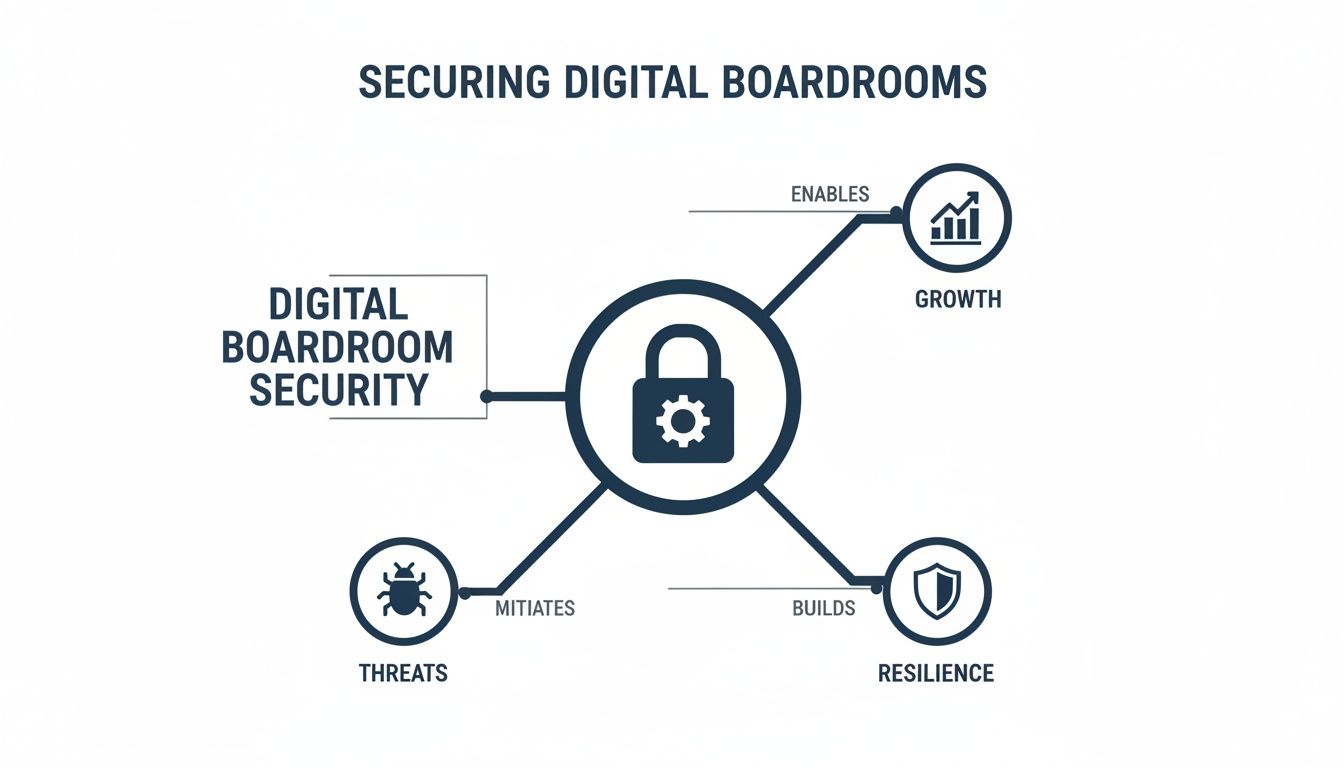
The real insight here is that a secure platform is not just a defensive measure. It is an enabler. Consequently, it gives your organisation the confidence to expand and operate effectively in a hybrid world.
Identifying Primary Attack Surfaces
Once you have mapped the architecture, you can start pinpointing where attackers are most likely to strike. An attack surface is simply every possible entry point where an unauthorised user could try to access or extract data from the system. For video conferencing systems, these are unfortunately quite diverse.
The biggest mistake you can make is assuming the vendor has secured everything out of the box. Default settings are nearly always designed for ease of use, not a zero-trust security posture.
Vulnerabilities tend to crop up in a few key areas time and time again.
- Unpatched Client Software: Outdated apps on user devices are low-hanging fruit for attackers. A single known exploit can be enough to compromise a device and, with it, every meeting that user joins.
- Weak Authentication: Relying on simple passwords or failing to enforce multi-factor authentication (MFA) creates a straightforward path for account takeover and uninvited guests in your meetings.
- Insecure API Integrations: Connecting video platforms to other tools like calendars or CRMs is common, but poorly secured APIs can be exploited to scrape meeting data or even manipulate sessions.
- In-Transit Data: If traffic is not protected with mandatory end-to-end encryption (E2EE), data streams can be intercepted and decrypted as they move through the vendor’s media servers.
Australian Threat Scenarios
These are not just theoretical problems. For Australian organisations, these vulnerabilities translate into very real business risks with serious consequences.
Imagine a telehealth provider using a platform without enforced E2EE. An attacker could find a weakness in the vendor’s cloud infrastructure and intercept a patient consultation. This would immediately trigger a notifiable data breach under the Privacy Act.
Or think about a board meeting for a financial services firm discussing a confidential merger. A simple “Zoom-bombing” incident, usually caused by weak meeting passwords or publicly shared links, could leak market-sensitive information, risking insider trading and severe reputational damage.
This foundational understanding of architecture and attack surfaces is the bedrock of any meaningful risk assessment. To explore this further, see our guide on how to conduct a risk assessment for your critical systems. Building this knowledge allows you to move beyond generic checklists and focus on the specific threats that actually matter to your organisation.
Navigating Australian Compliance and Data Sovereignty
For any Australian organisation, regulatory compliance is not just a box-ticking exercise; it is a fundamental part of risk management. When it comes to video conferencing systems, aligning your chosen platform with national and industry standards is non-negotiable. This demands a practical approach to meeting your obligations without slowing down the business.
Each framework, from ISO 27001 to the ASD Essential Eight, carries specific requirements that directly influence how you choose, deploy, and manage your collaboration tools. Indeed, getting this wrong can lead to significant compliance failures, attracting not just financial penalties but serious reputational damage.
Key Compliance Frameworks and Their Impact
The regulations that apply to you will depend on your industry and the sensitivity of the data you handle. For instance, a financial services firm using a video platform for client wealth consultations could easily bring that system into the scope of the Payment Card Industry Data Security Standard (PCI-DSS). Likewise, government agencies and their partners must prioritise solutions that have passed a rigorous Infosec Registered Assessors Program (IRAP) assessment.
To make sense of the landscape, we have mapped the most common frameworks to their objectives in a video conferencing context. This table shows how high-level standards translate into specific, tangible security controls.
Australian Compliance Frameworks for Video Conferencing
| Framework | Primary Control Objective | Example for Video Conferencing |
|---|---|---|
| ISO 27001 | Establish, implement, maintain, and continually improve an Information Security Management System (ISMS). | Implementing access controls for meeting recordings and integrating platform logs into your security monitoring processes (Annex A.12). |
| SOC 2 | Report on controls at a service organisation relevant to Security, Availability, Processing Integrity, Confidentiality, and Privacy. | Verifying your vendor provides a SOC 2 Type II report to attest to the security of their cloud infrastructure and operational processes. |
| ASD Essential Eight | Provide a baseline of prioritised mitigation strategies to help organisations protect themselves against various cyber threats. | Ensuring user application hardening is applied to all video conferencing clients and that multi-factor authentication (MFA) is enforced (Maturity Level 2+). |
| IRAP | Assess system security against Australian government security requirements, validating that a system is suitable to handle government information. | Selecting a vendor that has completed an IRAP assessment to the appropriate level (e.g., PROTECTED) for use in government contracts. |
As the table shows, compliance is not just about the vendor’s security—it is about how their platform integrates with your own security program and meets specific Australian government and industry benchmarks.
The Critical Issue of Data Sovereignty
Beyond these specific frameworks lies the overarching concern for most Australian leaders: data sovereignty. This is the principle that your information is subject to the laws and governance of the nation where it is collected and stored. When you use a global cloud provider for your video conferencing systems, your data—including recordings, transcripts, chat logs, and user metadata—can end up in data centres outside Australia.
This introduces major legal and compliance risks, particularly around the Australian Privacy Act and its Australian Privacy Principles (APPs). You are ultimately responsible for protecting the personal information you handle, no matter where your vendor decides to store it. Our guide to the Australian Privacy Principles provides a much deeper dive into these obligations.
The question is no longer just “Is our data encrypted?” but “Where is our data, who can access it, and under what legal jurisdiction?” For Australian CISOs, getting clear, unambiguous answers from vendors is a fundamental part of due diligence.
Recent research confirms this is not just a theoretical concern. Data sovereignty fears now impact 60% of organisations with decentralised teams, highlighting a critical new front in cybersecurity. You can read the full research on the Australian video conferencing market to see how these trends are shaping investment.
Practical Questions for Vendor Due Diligence
To tackle these data sovereignty risks head-on, your vendor assessment process needs to go beyond generic assurances. You need specific, pointed questions and, ideally, contractual commitments.
Your checklist should include the following:
- Primary Data Residency: Can you guarantee that all our data, including primary content like recordings and all associated metadata, will be stored exclusively in Australian data centres?
- Data Transit Paths: How do you ensure our data does not transit through or get processed in foreign jurisdictions, even temporarily?
- Government Access Requests: What is your documented policy for responding to lawful access requests from foreign governments? At what point would you notify us?
- Sub-processor Locations: Can you provide a complete, up-to-date list of all sub-processors that will handle our data and the locations of their operations?
Demanding transparent answers to these questions ensures the video conferencing systems you choose do not just meet business needs, but also uphold your critical compliance and data protection duties. This level of rigour is what builds a truly resilient and defensible security posture.
Implementing Essential Technical and Organisational Controls
Knowing your compliance duties and attack surfaces is one thing, but securing your video conferencing systems comes down to what you actually implement. Real security is built on a layered defence that combines solid technical safeguards with clear, human-focused organisational policies. In short, you cannot have one without the other.
This approach creates a far more resilient security posture. The technology hardens the system against attack, while your people are equipped to use it safely and spot threats. For Australian CISOs, the job is to orchestrate these controls to protect data at both the machine and human level.
Foundational Technical Controls
Technical controls are the absolute baseline for your security strategy. Think of them as the automated safeguards that enforce your security rules without anyone needing to lift a finger—the digital locks, reinforced walls, and surveillance cameras for your virtual meeting rooms.
A strong starting point is adopting a zero-trust mindset, where trust is never assumed.
Key technical controls include:
- Mandatory End-to-End Encryption (E2EE): This is the gold standard for keeping conversations private. E2EE ensures only the people in the meeting can decrypt the video and audio, meaning not even the service provider can access the content. For any discussion involving sensitive IP or personal data, E2EE is not negotiable.
- Enforced Multi-Factor Authentication (MFA): Passwords on their own just do not cut it anymore. Enforcing MFA across all users dramatically cuts the risk of account takeover, which is a primary way attackers gain unauthorised access to meetings. Importantly, this is a core control in the ASD Essential Eight.
- SIEM Integration: Your video conferencing platform is a rich source of security logs, covering everything from login attempts to admin changes. Feeding these logs into your Security Information and Event Management (SIEM) solution gives your security team the visibility needed to spot and respond to unusual activity fast.
- Secure Configuration and Hardening: Never trust the default settings. You need to get in there and proactively disable high-risk features like unrestricted file sharing, remote screen control for guests, and meetings that anyone can join. The goal is to apply the principle of least privilege, enabling only the functions your business truly needs.
The most secure video conferencing systems are those where security is the default, running silently in the background. By enforcing controls like E2EE and MFA at the platform level, you lift the security burden from your users and raise your defensive baseline significantly.
Crucial Organisational Controls
While your tech provides the guardrails, your people are on the front line every day. Organisational controls are all about shaping user behaviour and putting clear processes in place to reduce human error, which still plays a role in over 70% of data breaches.
These controls build a culture of security awareness, where staff understand the risks and their part in managing them. It also means being proactive, such as addressing critical security vulnerabilities in the network gear that underpins your video conferencing setup.
Crucial organisational controls include:
- Formal Acceptable Use Policy (AUP): Develop a clear, simple policy that spells out the rules for using company-approved platforms. It should state what is and is not allowed, like recording meetings without consent or discussing classified information on calls that are not end-to-end encrypted.
- Regular Security Awareness Training: Run training that focuses on threats specific to collaboration tools. For instance, use real-world examples, like phishing emails with fake meeting invites or social engineering tactics used to trick employees into giving away sensitive information during a call.
- Standardised Meeting Security Protocols: Create simple, easy-to-follow checklists for meeting hosts. This should include using unique meeting passwords, enabling a “waiting room” to screen attendees before they join, and locking the meeting once everyone expected has arrived.
- Incident Response Playbooks: Have a plan ready for incidents like “Zoombombing” or an account compromise. Make sure hosts know exactly who to call and what to do immediately to contain the threat, like ejecting an intruder and saving the logs for investigation.
By weaving these technical and organisational measures together, you create a layered defence that is far more effective than any single control. This integrated approach ensures your video conferencing systems remain a powerful business tool, not an open door for cyber threats.
Your CISO Checklist for Vendor Selection and Hardening
Picking the right vendor and securing their platform are two decisions that can define a CISO’s tenure. A consistent, repeatable process for selecting and hardening video conferencing systems is fundamental. It embeds security from the start, rather than scrambling to fix things after a breach.
This work begins well before you sign any contracts. Rigorous vendor due diligence is your first line of defence, making sure a partner’s security posture actually meets your organisation’s risk appetite. This is a core part of any mature third-party risk management program, protecting you from vulnerabilities introduced through your supply chain.
Key Questions for Vendor Selection
When assessing a potential vendor, you need to cut through the marketing noise and get to the technical facts. Your procurement team needs to be equipped with questions that demand specific, verifiable answers.
- Security Architecture and Data Sovereignty: Where will our data—recordings, metadata, chat logs—actually be stored and processed? Can you commit contractually to Australian data residency?
- Encryption Standards: Do you enable end-to-end encryption (E2EE) by default? If not, what is the default model, and what are its real-world limitations?
- Third-Party Attestations: Can you provide current SOC 2 Type II reports and ISO 27001 certifications? Have you gone through an IRAP assessment for handling Australian government information?
The need for this rigour is clear in sectors like telehealth. Since 2020, its use has surged, yet an estimated 25% of platforms still lack E2EE, creating massive opportunities for data theft. This fact alone highlights why a tough vendor selection process is non-negotiable.
The Platform Hardening Guide
Once you have chosen a vendor, the real security work begins. Default settings are almost always built for convenience, not for a zero-trust security model. A methodical hardening process is essential to shrink the attack surface before a single user logs in.
Hardening is not a one-time setup task; it is the first step in a continuous security lifecycle. The goal is to apply the principle of least privilege, turning off any feature or setting not absolutely essential for business operations.
This approach transforms the platform from a generic, off-the-shelf tool into a secure asset configured specifically for your organisation’s risk profile and needs.
Step-by-Step Hardening Checklist
Your deployment team should follow a documented process to guarantee consistency and avoid common mistakes.
- Integrate Identity Management: First, connect the platform to your identity provider (like Azure AD) for Single Sign-On (SSO). This centralises authentication, allowing you to enforce your existing password and MFA policies seamlessly.
- Disable High-Risk Features: Next, go through every administrative setting and turn off anything non-essential. This usually includes public-by-default meetings, guest screen control, unauthenticated file sharing, and automatic call recording.
- Configure Secure Meeting Defaults: Then, set secure defaults for every user from day one. This means mandating waiting rooms, requiring meeting passcodes, and disabling the ability for participants to join before the host arrives.
- Validate Security with Testing: Before going live, get a third party to validate your work. A skilled partner can help with finding a reliable pentest vendor to check your configuration for common weaknesses and overlooked vulnerabilities.
By following this two-phase approach—rigorous selection followed by methodical hardening—you ensure your chosen video conferencing systems are not just functional, but genuinely secure from the moment of deployment.
Establishing Continuous Assurance and Incident Response
Securing your video conferencing systems is never a one-and-done project. It is a discipline that demands constant attention. Once you have deployed and hardened your platforms, the real work begins: maintaining that security posture through continuous assurance and a razor-sharp incident response capability.
First, you should treat your collaboration tools as a primary source of security intelligence. Their logs and telemetry need to be piped directly into your security operations centre (SOC). Ignoring them leaves a massive blind spot your security team simply cannot afford.
This integration allows your SIEM to do its job. It should be configured to flag suspicious activity like an Australian-based employee suddenly logging in from an unfamiliar overseas IP address. Furthermore, it should also alert on unusual data access, such as a user suddenly downloading a huge volume of meeting recordings. These are classic indicators of a potential account takeover.
Building a Proactive Monitoring Strategy
A truly proactive strategy goes far beyond just collecting logs and waiting for an alert. It means actively hunting for threats and ensuring your systems are always in an audit-ready state. This is where automation and continuous monitoring come in, validating that your security controls are not just present, but actually working as intended.
A “set and forget” approach to securing video conferencing systems is a recipe for failure. Configurations drift, new vulnerabilities emerge, and user behaviour changes. Continuous assurance is the only way to keep pace.
A proactive stance involves a few key disciplines:
- Automated Configuration Audits: Use scripts to constantly check your platform’s settings against your hardened security baseline. If a high-risk setting like anonymous public access is somehow re-enabled, your team needs an immediate alert.
- Regular Access Reviews: Automate quarterly reviews that push notifications to business managers, requiring them to certify that their team members still need their current access levels. This is one of the most effective ways to fight “privilege creep”.
- Threat Intelligence Integration: Your SOC needs to know what attack techniques are targeting your specific video conferencing vendor. Feed relevant threat intelligence directly into your monitoring tools to help analysts spot emerging campaigns.
Planning for In-Meeting Incidents
While strong monitoring helps prevent many incidents, you must also be prepared to act decisively when one happens mid-call. A generic corporate incident response plan will not cut it. You need specific, pre-agreed playbooks for threats unique to video conferencing systems, such as “meeting bombing” or an active data breach during a live session.
A well-defined plan is what separates a managed incident from total chaos. To build a robust framework, it pays to review established best practices. You can get a head start by exploring our detailed guide on creating a computer incident response plan.
Your playbook must give meeting hosts simple, clear instructions on what to do in the heat of the moment. This includes how to eject an intruder, how to lock the meeting to prevent them from re-joining, and how to preserve vital evidence like chat logs and participant lists for forensic analysis. Just as importantly, the plan must outline how and when to communicate the incident, ensuring you control the narrative.
Frequently Asked Questions
As Australian organisations rely more on video conferencing systems, IT and security leaders find themselves asking the same critical questions about risk and compliance. Here are direct answers to the most common queries we hear.
Is End-to-End Encryption Really Necessary for Our Business?
Yes, absolutely. For any Australian organisation that handles sensitive information—whether in finance, healthcare, legal, or government—End-to-End Encryption (E2EE) is a non-negotiable control. Standard encryption only secures data between your device and the vendor’s server, which means the provider themselves could potentially access your meeting content.
E2EE closes this critical gap. It ensures that only the intended meeting participants can decrypt the conversation. This is not just a technical preference; it is a fundamental requirement for upholding your obligations under the Australian Privacy Act and protecting sensitive data.
Without E2EE, you are placing complete and implicit trust in your vendor’s infrastructure and personnel. For most organisations, that is an unacceptable risk to take with sensitive discussions.
How Do We Manage Security When Our Team Uses Multiple Platforms?
This “platform sprawl” is a common and significant security headache. It creates inconsistent controls and dramatically expands your attack surface. Regaining control requires a structured, three-pronged approach.
First, you need to standardise on one or two approved platforms. These should be the only ones that have passed your formal vendor risk assessment process. This immediately shrinks the number of systems you have to secure, harden, and monitor.
Next, establish a universal security policy for video conferencing that applies to all approved tools. This policy should mandate core security settings, such as:
- Enforced Multi-Factor Authentication (MFA) for every user.
- The use of waiting rooms to screen all external attendees.
- Mandatory passcodes for every scheduled meeting.
Finally, use a central identity provider for Single Sign-On (SSO). Doing so enforces consistent authentication rules and makes it simple to manage user access. When an employee leaves the organisation, their access to all video conferencing tools is revoked in one go.
What Is the Biggest Security Mistake Organisations Make?
The single biggest—and most dangerous—mistake is simply accepting the vendor’s default, out-of-the-box settings. Platform providers almost always configure their video conferencing systems for maximum ease of use, not maximum security. This often leaves high-risk features enabled by default.
Proactive hardening is essential. Australian CISOs must ensure their IT teams meticulously review every single configuration setting and disable any feature that is not strictly required for business. Assuming a platform is “secure by default” is a critical oversight that leaves the door wide open for attackers.
At CyberPulse, our expert consultants help Australian organisations secure their entire technology stack, from video conferencing systems to cloud infrastructure. We provide tailored strategies for ISO 27001, SOC 2, and the ASD Essential Eight, moving your team from point-in-time checks to a state of continuous, proactive defence. Secure your digital boardroom by visiting https://www.cyberpulse.com.au.
Browse to Read Our Most Recent Articles & Blogs
Subscribe for Early Access to Our Latest Articles & Resources
Connect with us on Social Media